Santa Caught on Camera: How to Make Proof Kids Believe
2026-10-30
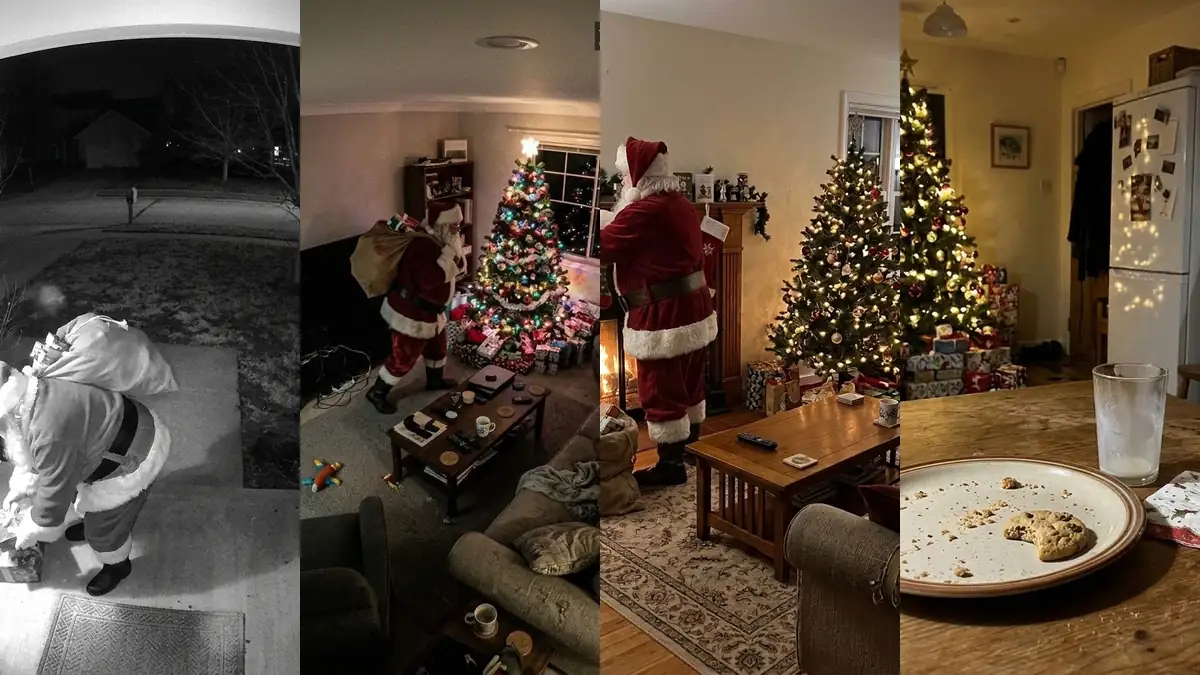
To catch Santa on camera, take a screenshot from your own doorbell or living room camera (or a photo of the room on Christmas Eve), add Santa with an AI photo or video tool, and show the kids a quick look on Christmas morning. The ones kids believe show Santa busy and turned away, late at night, in your real home.
Was Santa Ever Really Caught on Camera?
The clips you see every December, with Santa on a doorbell camera or tiptoeing past a nanny cam, are made by parents. Some use a relative in a red suit, some use editing apps, and more and more use AI to place Santa into a real frame from their own camera. That is the tradition: the footage isn't real, but the excitement on Christmas morning is.
What has changed is how easy it got. A few years ago it took video editing skills. Now you can start from one screenshot and have a believable clip in a few minutes.
What Makes a Santa Photo Believable
Parents who do this every year share the same rules, and most of them are about what not to show:
- Santa is busy, not posing. Filling stockings, setting down presents, tiptoeing past. Real cameras catch people who don't know they're being filmed, so he shouldn't smile or wave into the lens.
- It's late on Christmas Eve. A timestamp between about 11 PM and 2 AM on December 24 does half the convincing.
- It's dark and quick. Night vision, grain and a half-turned figure look more real than a sharp, bright portrait.
- It's your house. Kids recognize their own porch, rug and tree immediately. A stock living room gives the game away.
- The details add up. Santa is the right size for your door, nobody else is in the frame, and nothing modern sits in his hands.
5 Ways to Catch Santa on Camera
- Your doorbell camera. Screenshot the night view of your porch, then add Santa to the photo with the Santa at Your Door scene. The fisheye and black-and-white night vision stay; Santa bends down to leave presents on the doorstep.
- A living room "CAM 01" frame. No camera indoors? Photograph the room from a high corner with the tree in view and choose Santa Caught on Camera. The photo becomes a grainy night-time frame with a Christmas Eve timestamp.
- A moving clip. Turn the same screenshot into a 5-second AI Santa video: Santa walks up, drops the presents and walks out of frame. Moving footage is the most convincing of all.
- Evidence only. The Santa Was Here scene adds no Santa at all, just presents under the tree, a half-eaten cookie, an empty milk glass and sooty boot prints. With no face to study, there is nothing to question.
- The old-fashioned way. Ask a relative in a Santa suit to walk past your real doorbell camera after the kids are asleep, and let the camera record it. Free, but you need the suit and a willing Santa.
Step by Step: Santa on Your Doorbell Camera
- Open your doorbell or camera app at night and take a screenshot of the live view or a recent clip. A frame with an empty porch works best.
- Go to Add Santa to Photo, upload the screenshot and pick Santa at Your Door or Santa Caught on Camera.
- Download the result. Your first photo is free on each device, no account needed; after that a photo costs 5 credits.
- For video, open the AI Santa video page, upload the same screenshot and choose Santa on Your Doorbell Cam. A 5-second clip costs 20 credits and needs a free account.
One honest limit: video models sometimes redraw small text, so timestamp digits can flicker during a clip. A frame with a small, simple timestamp works best, and you can crop the corner out before you show it.
Back It Up With Morning Evidence
A photo works best when the house agrees with it. Leave the plate with crumbs and one bitten cookie, drink most of the milk, and press a boot into a little flour or baking soda by the fireplace or door for footprints. Put the same wrapped presents under the tree that Santa was carrying in the picture; kids compare.
How to Show It Without Overdoing It
Show it once, on your phone, at breakfast. "Look what the camera caught last night" is enough. A printed photo gets studied for a week, and every extra look is a chance to spot something odd. Keep it within the family, too: these pictures are for fun at home, not something to post as real footage.
When the Questions Start
At some point a child asks straight out whether Santa is real. Many parents treat that as a promotion rather than an ending: Santa is the spirit of giving, grown-ups help him, and now you're old enough to help too, by picking a gift or keeping the secret for a younger sibling. Older kids often love making the caught-on-camera picture for their little brother or sister the next year.
Santa Caught on Camera FAQ
Was Santa ever caught on camera?
Not for real. The doorbell and nanny cam clips shared every Christmas are made by parents, with a relative in a Santa suit, editing apps or AI. They are a family tradition meant to keep the magic going for young kids.
How can I catch Santa on camera for free?
Upload a screenshot from your doorbell camera, or a photo of your living room, to an AI Santa photo tool. On AI Christmas Photo the first photo on each device is free with no sign-up. Or ask a relative in a Santa suit to walk past your real camera.
Can I use my Ring or doorbell camera footage?
Yes. Take a screenshot of the night view in your camera app and upload it. The fisheye view, night vision and timestamp are kept, and Santa is added inside the frame, as a photo or a short video.
Should Santa look at the camera?
No. Footage looks real when Santa is busy and doesn't know he is being filmed. Choose a moment like filling stockings or leaving presents at the door, and skip waving and winking.
Is there a way to show Santa came without showing Santa?
Yes. A "Santa was here" picture keeps your room as it is and adds the evidence: presents under the tree, a half-eaten cookie, an empty glass of milk and sooty boot prints. It pairs well with real crumbs and footprints in the morning.